.webp)
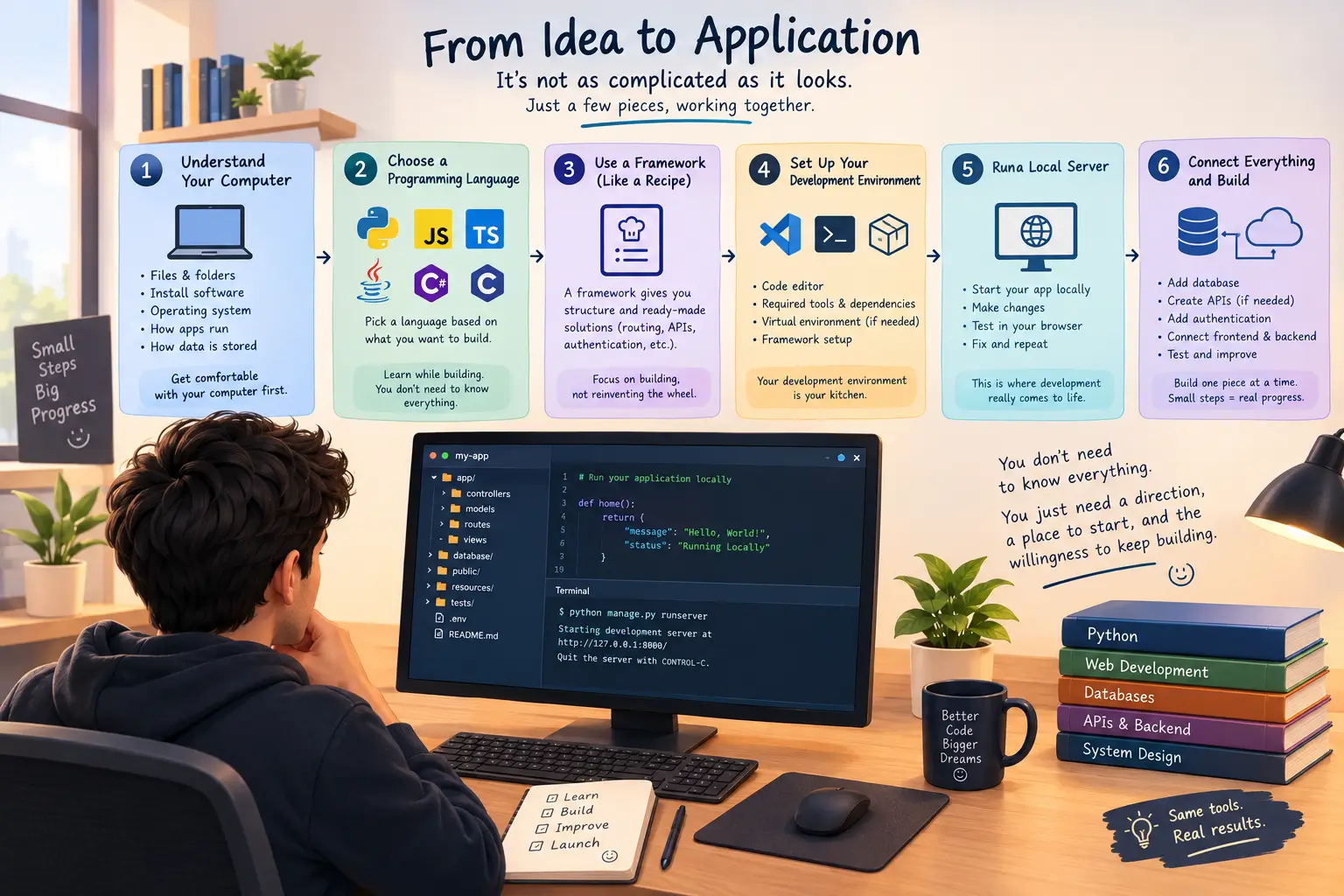
Before we talk about programming languages, frameworks, servers, databases, or AI, there is one basic thing you should have: a basic understanding of how a computer works.
You don't need to become a computer engineer.
You should simply understand things like files and folders, how software is installed, what an operating system does, how applications run, and how your computer stores and processes information.
Why?
Because when you start programming, you are going to spend a lot of time telling your computer what to do. If you don't understand the environment you're working in, even simple problems can feel much bigger than they actually are.
So get comfortable with your computer first. Then we can move on.
Now You Want to Build an Application
Wait.
Are we jumping straight into building an application?
Yes.
But why?
Because this guide is not here to confuse you with a long list of things you supposedly need to learn before you can start building something.
Things are actually quite simple. People just have a habit of making them complicated, sometimes because the industry itself has made everything sound more complicated than it needs to be.
You want to build an application.
Good.
Let's work backwards and understand what you actually need.
Step One: Choose a Programming Language
Applications are built using code.
That code has to be written in a programming language, so your first real technical decision is choosing a language.
You might choose Python, JavaScript, TypeScript, PHP, Java, C#, or another language depending on what you're trying to build.
For this example, let's say you choose Python.
Now you might immediately think:
“Okay, now I have to learn the entire Python language before I can build anything.”
No.
You don't.
This is where things have changed quite a bit.
You can learn while building. And today, AI tools such as ChatGPT, Claude, and Gemini can help explain code, fix errors, generate examples, and guide you when you get stuck.
That doesn't mean you don't need to understand programming. You absolutely do.
It means you don't have to memorize everything before you start.
You Don't Need to Build Everything From Scratch
Now comes the part where beginners usually get overwhelmed.
You have selected Python.
Then you look at the idea of building a full application and think:
“Wait. How am I supposed to build the frontend, backend, APIs, routing, authentication, database connections, security and everything else?”
That sounds like a lot.
And if you tried to build all of those things from scratch every single time, it would be.
But you don't.
This is where frameworks come in.
Think of a Programming Language Like a Cooker
Here's an easier way to look at it.
Think of your programming language as a cooker.
The cooker gives you the ability to cook, but it doesn't tell you what you're making.
The framework is closer to the recipe and the kitchen setup.
A framework gives you a structure to work with. A lot of the common things developers repeatedly need have already been created for you.
Depending on the framework, you may already have systems for routing, handling requests, connecting to databases, building APIs, authentication, application structure, and many other common tasks.
So instead of spending your time reinventing the wheel, you can start working on the actual application.
If you're using Python, for example, you might choose Django for building a web application.
You don't need to build a web framework yourself before you can build your website.
That's the whole point.
But You Can't Just Install Django and Start
Well, technically, you can try.
But you're going to run into problems pretty quickly.
Before installing a framework such as Django, you need to prepare your development environment.
And this sounds technical, but the idea is actually very simple.
Your Development Environment Is Your Kitchen
Remember the cooker?
Now imagine you're actually going to cook.
You need a kitchen.
You need the cooker, ingredients, utensils, electricity, somewhere to prepare the food and everything else required to actually make the meal.
Your development environment is that kitchen.
It is the environment on your computer where you write, run, test, and manage your application.
Different programming languages and frameworks have different requirements.
For Python and Django, for example, you may need Python itself, a code editor, a virtual environment, Django, and eventually a database and other tools depending on what you're building.
You don't need to memorize all of this.
You need to understand what is required and why it is required.
This Is Where AI Can Actually Help You
This is one of the areas where AI can make programming much easier for someone starting out.
You can tell ChatGPT, Claude, or Gemini something as simple as:
“I want to build a Django application on Windows. I'm starting from scratch. Tell me what I need to install and guide me through setting up my development environment.”
And then follow the steps.
If something doesn't work, don't immediately assume you're not good at programming.
Copy the error and ask what it means.
This is an important change in how you should approach development.
You don't need to know everything.
You need to know how to find your way through things you don't know.
Now Set Up Your Local Server
Once your development environment is ready, you're getting much closer to actually building something.
Your application needs somewhere to run while you're developing it.
That's where your local development server comes in.
A local server basically allows you to run and test your application on your own computer instead of putting it on the internet immediately.
You make a change.
You run the application.
You open it in your browser.
You see what happened.
Something breaks?
You fix it.
You run it again.
This cycle is basically development.
And honestly, this is where programming starts becoming much more understandable.
Start Building One Piece at a Time
Don't look at your application as one giant thing.
Break it down.
First, make the application run.
Then build one page.
Then another.
Add your database.
Create an API if you need one.
Add authentication.
Connect the frontend and backend.
Test everything.
Fix what breaks.
Then keep going.
You don't need to understand the entire application on day one.
You only need to understand the next thing you are trying to build.
So Where Should You Actually Go From Here?
The path is much simpler than it first appears.
Start with basic computer knowledge.
Choose a programming language based on what you want to build.
Learn the fundamentals of that language while you work.
Choose an appropriate framework.
Set up your development environment.
Run your application locally.
Then start building small pieces instead of trying to create the entire application at once.
And when you get stuck, use documentation, search, communities, and yes, AI tools to help you understand what went wrong.
The goal isn't to become someone who knows every programming command by memory.
The goal is to become someone who can look at a problem, understand what is happening, find the information needed, and solve it.
That's what programming really starts becoming once you get past all the terminology.
You don't need to know everything before you begin.
You need a direction, a place to start, and the willingness to keep building.