.webp)
Most businesses do not choose their hosting stack. They drift into it. A managed platform here, a deployment tool there, a database service from a third company, and a dashboard for each one. Two years later nobody can say where the data actually lives, who can touch it, or what happens if one vendor changes its pricing overnight.
There is another way, and it is not as scary as it sounds. You can own your infrastructure on AWS, meaning you decide the network layout, the access rules, the deployment process and the backup policy. Think of it like renting an empty warehouse instead of renting a desk in a coworking space. The building belongs to someone else, but everything inside it is arranged by you, locked by you, and can be moved out by you.
This guide walks through how a small or midsized business can do exactly that using EC2, Elastic IPs, a CDN, automation scripts and a CI/CD pipeline. No code, just the thinking and the structure.
A quick honest note about what “owning” means
AWS is still a third party. Owning your infrastructure does not mean owning the data center. It means you own the architecture and the control. Your servers run standard Linux, your application runs in standard containers or processes, and your data sits in formats you can export. If you ever need to leave AWS, you can pick the whole thing up and move it. That portability is the real definition of ownership.
The opposite is a platform where your deployment logic, your database and your scaling rules all live inside a vendor’s proprietary system. That is renting, and the rent can change.
The big picture of the architecture
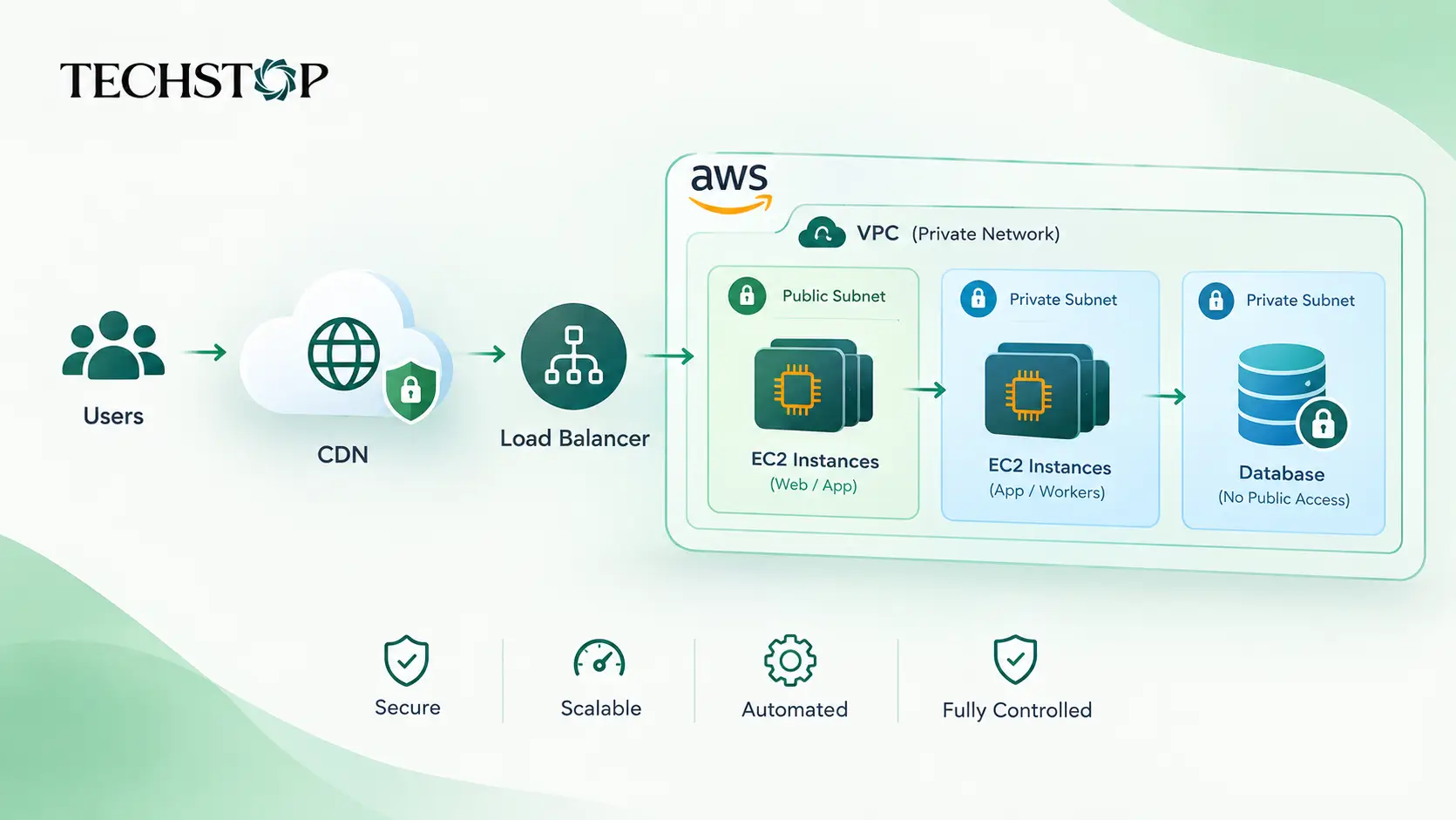
Picture your setup as three layers.
The first layer is the edge. This is your CDN, which sits in front of everything and talks to the public. Visitors never connect to your servers directly.
The second layer is the application layer. These are your EC2 instances running the app. They sit behind a load balancer or, for the smallest setups, a single instance with a fixed public address.
The third layer is the data layer. This is your database, and it lives in a private network with no door to the outside world at all. Only your application servers can reach it.
Everything else in this article is about building those three layers carefully and keeping them connected only in the ways you intend.
Start with your own private network
Before launching a single server, create a Virtual Private Cloud, which is your private network inside AWS. Inside it, split the space into public subnets and private subnets.
Public subnets hold only the things that must face the internet, such as a load balancer or a small gateway. Private subnets hold your application servers and your database. This split is the foundation of data breach prevention. A database in a private subnet has no route to the internet and no public address, so there is nothing for an attacker to scan or knock on.
For small businesses, a simple two subnet layout across one availability zone is a fine start. For midsized businesses, spread the layers across at least two availability zones so a single data center issue does not take you offline.
EC2 as the home of your application
EC2 gives you virtual servers that behave like machines you own. You choose the operating system, the size, the software and the update schedule.
For a small business, one or two well sized instances can comfortably run a website, an API and background jobs. Start modestly, measure real usage, and scale up only when the numbers tell you to. Many teams overbuy capacity out of fear, then pay for idle servers every month.
For a midsized business, run several instances in an auto scaling group. This means AWS adds or removes servers based on traffic, using a template that describes exactly how a server should look. Because every server is built from the same template, you stop treating servers like pets that need individual care and start treating them like identical, replaceable units. If one misbehaves, you terminate it and a fresh one takes its place.
Where Elastic IPs fit in
An Elastic IP is a fixed public address that you own for as long as you keep it. Normally, when an instance stops and starts, its public address changes. An Elastic IP stays put and can be reassigned to another instance in seconds.
This matters in a few practical ways. Your DNS records keep pointing to the right place even after a server is replaced. Partners and payment providers who allowlist your address never have to update their rules. And if a server fails, you can move the address to a standby machine and recover quickly.
A useful tip for midsized setups is to attach Elastic IPs to the outbound gateway that your private servers use to reach the internet. That way, every request leaving your network comes from a known, stable address, which makes it easy for third party services to trust you and easy for you to audit.
One caution. Elastic IPs are a tool for identity and stability, not a security measure on their own. A fixed address does not protect anything unless the rules around it are tight.
Put a CDN in front of everything
A content delivery network caches your static content, such as images, scripts and styles, at locations around the world. Visitors get files from a location near them, which makes the site feel faster, and your servers handle far fewer requests.
The security benefit is just as important. When the CDN is the only public entrance, you can configure your servers to accept traffic only from the CDN. Your origin servers become invisible to the wider internet. Attackers hit the CDN, which is built to absorb floods of traffic, instead of your small EC2 instance.
Pair the CDN with a web application firewall. This filters out common attacks such as injection attempts, bad bots and abusive request patterns before they ever reach your application. For small teams, managed rule sets provide solid protection without needing a dedicated security engineer.
Connecting your database without exposing it
This is the part where most breaches happen, so slow down here.
Rule one is that the database never gets a public address. Put it in a private subnet and leave it there.
Rule two is that access is controlled by security groups, which are virtual firewalls. Set the database security group to accept connections only from the application server security group, and nothing else. Not from an office IP, not from a developer laptop, not from the whole network. If a person needs to reach the database for maintenance, they go through a controlled, logged session rather than an open port.
Rule three is that everything is encrypted. Turn on encryption at rest so stored data and backups are scrambled on disk. Require encrypted connections between the app and the database so traffic inside your network cannot be read even if someone gets a foothold.
Rule four is that credentials are never written into code or config files sitting on a server. Store them in a secrets manager and let the application fetch them at startup using its own identity. When a password needs rotating, you rotate it in one place and nothing needs redeploying by hand.
A decision you will face is whether to run the database on your own EC2 instance or use a managed database service from AWS. Running it yourself gives maximum control and portability but means you handle patching, backups and failover. The managed route removes that burden and is still built on standard database engines you can export from. For most small and midsized businesses, the managed option in a private subnet is the sensible middle ground, as long as you keep exports and backups in your own storage too.
Lock down access to the servers themselves
Opening a remote login port to the whole internet is one of the most common and most avoidable mistakes. Instead, use AWS Systems Manager Session Manager, which lets authorized people open a shell on a server without any open inbound port, and records every session.
Give each server an instance role, which is an identity that grants only the permissions that server needs. A web server that only reads from one storage bucket should be able to do exactly that and nothing more. This is the principle of least privilege, and it limits the damage if any single machine is ever compromised.
Turn on multi factor authentication for every human account, avoid using the root account for daily work, and log all activity with CloudTrail so you always have a record of who changed what.
Automation scripts keep the human error out
Manual server management does not scale and it does not stay consistent. Every hand typed command is a chance for a mistake, and nobody remembers what was done six months ago.
Automate the repeating work with scripts. The jobs that matter most are these.
Server bootstrapping, so a new instance installs the right software, pulls the right configuration and joins the fleet without anyone logging in.
Patching and updates, scheduled during quiet hours and tested on a staging server first.
Backups, which take regular snapshots of disks and databases, copy them to a second region, and delete old ones on a schedule.
Health checks and self healing, which detect an unresponsive server and replace it automatically.
Log collection, so logs ship to a central place and are rotated before they fill the disk.
The goal is simple. If a server dies at three in the morning, nobody should need to wake up. The system should notice, replace it and tell you about it in the morning.
CI/CD brings deployments under control
A CI/CD pipeline is the assembly line between your code and your live servers. CI stands for continuous integration, where every change is automatically built and tested. CD stands for continuous delivery or deployment, where tested changes are shipped to servers in a repeatable way.
A healthy pipeline for a small or midsized business looks like this in plain terms. A developer pushes a change. The pipeline builds the application and runs the automated tests. If the tests pass, the result is packaged into a versioned artifact. That artifact is deployed first to a staging environment that mirrors production. After checks pass there, it goes to production.
For deployment style, prefer rolling or blue green releases. In a rolling release, servers are updated a few at a time so the site never goes fully down. In a blue green release, you build a complete new copy of the environment, switch traffic over when it is healthy, and keep the old copy ready for instant rollback. Either way, rollback should be a button, not a crisis.
Here is where I hold a firm opinion. Automation should not mean removing people from the loop. Put a manual approval step before production for anything risky, keep deployment permissions tight, and make sure every release is logged and traceable. Automate the boring parts, but keep a human accountable for the decisions that matter.
Watch everything, and set alerts that mean something
You cannot protect what you cannot see. Use CloudWatch to track server load, memory, disk space, error rates and response times. Set alerts for the things that actually need attention, such as a sudden spike in failed logins, a database nearing its storage limit or a deployment that failed health checks.
Too many alerts is as bad as too few. If your team ignores notifications because most are noise, the one that matters will be missed. Start with a short list and refine it over time.
What this looks like at two sizes
A small business with a website and a modest application can run on two EC2 instances behind a load balancer, one private database, a CDN with a firewall, nightly backups and a simple pipeline that deploys on every approved change. This setup is affordable, secure and easy for one or two people to manage.
A midsized business adds an auto scaling group across two or more availability zones, a database with automatic failover, separate staging and production environments, centralized logging, scheduled security reviews and a more formal approval flow in the pipeline. The ideas are the same. There are just more copies of each piece and more discipline around changes.
Mistakes worth avoiding
Leaving the database reachable from the internet, even temporarily, is the classic one. Temporary rules have a way of becoming permanent.
Using long lived access keys stored on servers or in code is another. Prefer roles and short lived credentials.
Skipping backup restore tests is a quiet killer. A backup you have never restored is a hope, not a plan.
Running everything in one availability zone saves a little money and risks a lot of downtime.
Finally, treating the setup as finished. Infrastructure needs regular review, patching and cost checks, just like the application on top of it.
The bottom line
Owning your infrastructure on AWS is not about avoiding the cloud. It is about refusing to hand over control of the pieces that define your business. With a private network, EC2 servers built from templates, Elastic IPs for stable identity, a CDN as your public shield, a locked down database, automation for the repetitive work and a CI/CD pipeline with human oversight, even a small team can run a setup that is faster, safer and far more portable than a stack of rented tools.